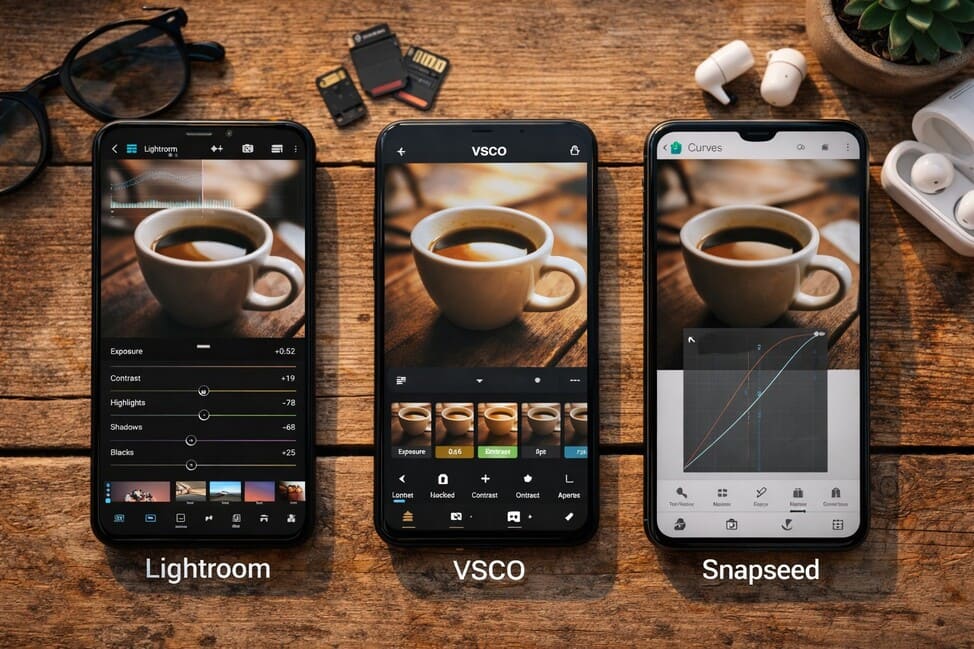
In today’s increasingly visual digital culture, where aesthetics speak louder than captions, editing photos has become a vital step in content creation. It’s not just about technical refinement — it’s a creative process that transforms an ordinary image into something memorable. Choosing the right photo editing app isn’t just a matter of convenience — it’s an extension of the creator’s visual identity.
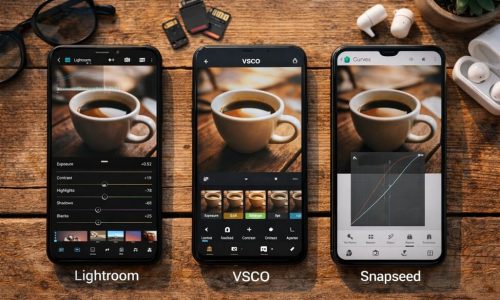
With smartphones becoming more powerful and cameras more intelligent, mobile editing has gained both freedom and sophistication. And when it comes to editing apps, three major names stand at the top: Lightroom, VSCO, and Snapseed. Each offers a unique approach, its own editing philosophy, and a loyal user base.
In this guide, we’ll dive deep into the features, strengths, limitations, and practical applications of these three giants. You’ll discover which one fits best with your creative process, technical needs, and — most importantly — your visual identity.
Why Photo Editing Apps Matter in Digital Identity
Before diving into features and comparisons, let’s understand why a good photo editing app is essential. In a world of curated feeds, strong personal brands, and highly competitive content, editing has become the link between technical capture and emotional expression.
Editing isn’t about deception. It’s about intention.
It’s how you make a photo say exactly what you mean.
With the right app:
- You ensure aesthetic consistency across your content;
- You can fix small flaws without losing authenticity;
- You develop a recognizable visual signature;
- You save time with presets and a solid editing workflow;
- And you increase the perceived value of your images, whether personal or professional.
Adobe Lightroom: Total Control in Your Hands
Best for:
Demanding creators, beginner and professional photographers, or anyone seeking full control over image editing.
Key features:
- RAW file editing for maximum detail;
- Manual adjustments: exposure, contrast, shadows, highlights, sharpness, texture, clarity, etc.;
- Selective editing tools for modifying specific areas;
- Preset creation and application;
- Lens correction and chromatic aberration removal;
- Cloud sync with the desktop version (Creative Cloud).
Strengths:
- Allows professional-grade editing on mobile;
- Clean and intuitive interface;
- Perfect for building a cohesive and polished visual identity;
- Preserves high image quality after deep editing.
Limitations:
- Some features are only available with a paid subscription (Lightroom Premium);
- Requires some technical knowledge to use effectively;
- Might feel too “technical” for creators looking for fast emotional edits.
When to use it:
- For detailed photo editing and precision;
- For content creators building a consistent visual language;
- For editing RAW photos from smartphones or cameras.
VSCO: Sensory and Stylish Editing
Best for:
Visual artists who value atmosphere, filters with personality, and quick but impactful edits.
Key features:
- Film-inspired filters (Kodak, Fuji, Agfa, etc.);
- Basic adjustments: brightness, contrast, temperature, fade, skin tone, grain;
- Video editing in the Pro version;
- Extremely minimalist interface;
- In-app community with daily inspiration and curated content.
Strengths:
- Filters have a distinct artistic and emotional signature;
- Extremely user-friendly, great for beginners;
- Encourages stylistic exploration;
- Perfect for quick edits with emotional impact.
Limitations:
- Most filters and advanced features require a subscription;
- Lacks advanced control and selective editing;
- Doesn’t support RAW file editing.
When to use it:
- For lifestyle content and artistic visuals;
- When speed and style matter more than technical detail;
- For creating content that feels emotional and cinematic.
Snapseed: Technical Depth for Free
Best for:
Intermediate and advanced users who want deep editing tools without paying for them.
Key features:
- Powerful tools: curves, selective adjustments, brush tool, RAW editing;
- Portrait retouching (face focus, skin smoothing);
- Artistic filters (vintage, grunge, focus blur, drama);
- Option to save “looks” for repeated use;
- No in-app ads or payments.
Strengths:
- 100% free, with no critical feature locked;
- Offers technical depth usually found in paid apps;
- Clean and efficient interface;
- Great for learning how to edit with more control.
Limitations:
- Interface is functional but visually outdated compared to others;
- No cloud sync or preset management;
- Requires time and practice to master.
When to use it:
- For advanced technical editing on a budget;
- For personal projects that require precise control;
- For RAW photo editing without subscriptions.
How Each App Transforms the Same Photo
Let’s imagine one simple image: a bicycle against a brick wall in soft afternoon light. Here’s how it would be edited in each app:
- In Lightroom, you adjust exposure and contrast, lift the shadows, reduce highlights, individually tune colors, and apply a custom preset to match your brand style.
- In VSCO, you apply a pastel-toned filter, increase fade for a washed-out look, and add subtle grain for a nostalgic, analog feel.
- In Snapseed, you adjust curves for perfect light balance, sharpen the bike, soften the background, and enhance the wall texture.
One image. Three edits. Three completely different interpretations.
Feature Comparison Table
| Feature | Lightroom | VSCO | Snapseed |
| Control level | Advanced | Basic to Medium | Medium to Advanced |
| Ease of use | Moderate | Very High | Moderate |
| RAW editing | Yes | No | Yes |
| Presets/Filters | Custom Presets | Film-Inspired Filters | Saveable “Looks” |
| Selective editing | Yes (Premium) | No | Yes |
| Video editing | No | Yes (Pro) | No |
| Price | Free + Premium | Free + Subscription | Completely Free |
| Best for | Professionals | Lifestyle Creators | Technical Users |
How to Choose the Best Photo Editing App for Your Style
Your choice depends on the type of creator you are:
- Need high control, pro-level results, and advanced adjustments?
Go with Lightroom. - Want to express mood, style, and creativity effortlessly?
VSCO is your perfect match. - Looking for powerful editing tools for free?
Snapseed delivers the best value.
But you don’t need to choose just one. Many creators use a hybrid workflow: basic color grading in Snapseed, mood filters in VSCO, or deep adjustments in Lightroom with finishing touches elsewhere.
Create Your Editing Workflow
Whichever photo editing app you choose, creating an editing workflow is key to consistency and productivity:
- Capture with intention: pay attention to light and composition.
- Organize your images: sort by theme, project, or platform.
- Curate your shots: pick only the best to edit.
- Edit in batches: use presets or repeat common edits.
- Optimize per platform: adapt size and framing for Instagram, Pinterest, websites, etc.
- Compare before/after: every edit should enhance the story — not just the look.
This workflow builds rhythm into your creative process, saving time and helping you refine your visual identity.
The Best App is the One That Serves Your Vision
Among all the features, charts, and filters, one truth remains: the best photo editing app is the one that helps you tell your story — your way. Whether through subtle adjustments or bold filters, what matters most is that your edit expresses your unique perspective.
In your pocket, you hold a powerful creative tool. But it’s your vision that turns it into art.
Test. Explore. Adjust. Rework.
And keep creating — your next photo might be your best yet.