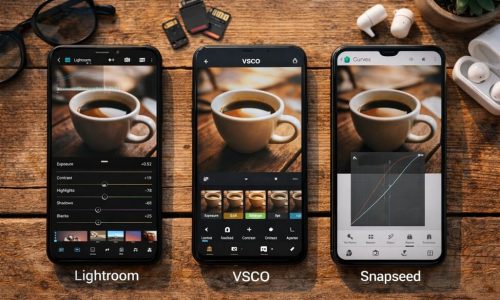
Have you ever scrolled through your own profile and felt like something is “off,” even though you’re posting good photos? Most of the time, it’s not a quality problem—it’s a system problem. A beautiful feed isn’t luck. It’s the result of simple choices repeated with consistency. And the best part is you don’t need to be a designer, you don’t need a pro camera, and you don’t need to spend hours editing to learn how to organize a feed with a strong visual identity.
In this guide, you’ll learn how to organize a feed from scratch using a clear, practical method that works for personal profiles, creators, small brands, and lifestyle projects. The goal is to help every post “talk” to the next, creating harmony, recognition, and that instant “I want to follow this” feeling.
What actually makes a feed “beautiful”
Before the step-by-step, let’s clarify what “beautiful” really means here. A beautiful feed doesn’t have to be perfect or identical. It usually communicates:
Visual coherence
Colors, contrast, and mood feel like they belong to the same universe.
Topic clarity
People instantly understand what your profile is about.
Rhythm and breathing room
The grid doesn’t feel heavy—there’s a healthy mix of “busy” photos and calmer images with negative space (walls, sky, simple backgrounds).
When you learn how to organize a feed, the goal is coherence without losing naturalness.
Common mistakes that break consistency
Many people try how to organize a feed and give up because they fall into a few patterns:
Changing style every week
Minimal today, super vibrant tomorrow, then dark cinematic the next. It confuses the eye.
Editing every photo differently
One post is warm, the next is blue, the next is saturated. The grid becomes a random collage.
Posting without looking at the set
The photo is good, but it clashes with the last 9 posts.
Copying someone else’s feed
References are helpful, but copying locks you in. Learning how to organize a feed is about finding a system that fits your content and personality.
How to organize a feed: the 7-step method
Here’s a workflow that works for beginners and for people who already post regularly. Use it as a fixed checklist.
Step 1) Define your profile’s “core theme”
To master how to organize a feed with intention, you need an axis. Ask:
- What do I want people to associate with me?
- What content do I post most often?
- What vibe do I want to deliver (light, sophisticated, playful, urban, cozy)?
Core theme examples
For Digital Culture + Visual Lifestyle
- Creative routine (work, coffee, desk setup, apps)
- Fashion and everyday aesthetics
- Travel and city life
- Mobile photography and behind-the-scenes
- Wellness and lifestyle (without miracle promises)
A core theme gives direction. Direction is the foundation of how to organize a feed.
Step 2) Choose a simple visual identity
You don’t need a complex color palette. You need consistency.
Three easy directions:
1) Warm tones
Beige, brown, golden light, warmer skin tones, cozy mood.
2) Cool tones
Blues, grays, black, modern urban look.
3) Balanced neutral
Whites, soft grays, moderate saturation, clean feel.
The secret to how to organize a feed is choosing a direction and sticking to it for at least 30 days.
Step 3) Create “editing rules” (a mental preset)
This is where you define how your images behave. You don’t need technical language—just decisions.
Practical editing rules:
- Exposure: slightly brighter or moodier?
- Contrast: soft or strong?
- Saturation: low, medium, or high?
- Temperature: warmer, cooler, or neutral?
- Sharpness: subtle (recommended) or punchy?
Once you standardize this, how to organize a feed becomes easier because consistency happens naturally.
Tip
Edit 3 “reference photos”
Pick 3 images that represent your ideal look, edit them until they’re perfect, and keep them as references. Every time you prepare a new post, compare it to those 3. This habit accelerates how to organize a feed dramatically.
Step 4) Plan in blocks (without overcomplicating)
You don’t need to plan 60 posts. Plan 9 to 12.
Why 9?
Because that’s the first impression—what people see when they land on your profile.
Block structure (example)
- 3 lifestyle photos (you, routines, moments)
- 3 detail shots (hands, objects, close-ups)
- 3 informative posts (carousel tips, visual mini-guides, quick educational graphics)
That balance creates rhythm and makes how to organize a feed feel intentional without being repetitive.
Step 5) Define composition patterns
Composition is one of the strongest pillars of how to organize a feed that looks “professional.”
Simple patterns that work:
- Clean backgrounds (walls, sky, wood, fabric)
- Consistent angles (mostly top-down, mostly eye-level, or a planned alternation)
- Negative space (empty areas that give breathing room)
- Clear subject placement (centered or rule of thirds, but with logic)
Tip
Have 2 “go-to locations”
One spot at home + one outdoor location (coffee shop, street, park). Alternating between two familiar environments helps a lot with how to organize a feed because it creates recognizable visual continuity.
Step 6) Build a format mix (photo, carousel, short video)
Consistency isn’t only aesthetic—it’s also experience. You can keep harmony while using different formats.
Recommended mix for beginners:
- 50% photos (identity and visuals)
- 30% carousels (value and saves)
- 20% short videos (reach)
When you understand how to organize a feed, you realize the visuals hold attention, and the content structure supports growth.
Step 7) Publish using a consistency checklist
Before you post, ask:
- Does this fit with the last 9 posts?
- Does it match my “3 reference photos” mood?
- Are the colors pulling too far in one direction?
- Is there a visual element that fights the grid (neon, heavy red, blown highlights)?
- Am I repeating the same type of photo too many times in a row?
This quick check prevents regret and turns how to organize a feed into a habit, not a struggle.
How to organize a feed: a practical step-by-step you can apply today
Here’s the “do this now” version.
Step 1) Audit your profile
Open your grid and look at your last 12 posts. Write down:
- What’s working visually?
- What breaks the pattern?
- Which colors appear most often?
- Which photo types represent you best?
This audit is essential in how to organize a feed because it replaces guessing with clarity.
Step 2) Pick one style for your next 9 posts
Choose one direction (warm, cool, or neutral) and commit.
Step 3) Collect 20 photos in your camera roll
Yes—20. You’ll select the strongest later.
Step 4) Edit everything in the same mood
Use the same rules: similar exposure, contrast, and color intensity.
Step 5) Select 9 and organize the order
Try to alternate:
- Face photo / no-face photo
- Bright photo / darker photo
- Wide environment / detail close-up
This alternation is a classic trick in how to organize a feed that instantly raises the “designer” feel.
Step 6) Post 3 and observe the grid
You don’t need to post 9 in a row. Post 3, observe how they sit in the grid, and adjust the next 6.
Three consistent feed models you can copy the logic from
This isn’t about copying someone’s style. It’s about copying structure—the healthiest shortcut for how to organize a feed.
Model 1) Minimal and clean feed
- Light backgrounds
- Few strong colors
- Lots of breathing room
- Minimal graphics and subtle typography (if you use text posts)
Ideal for lifestyle, productivity, calm aesthetics.
Model 2) Urban and modern feed
- Cool tones, deeper shadows
- Medium contrast
- Street elements, architecture, night scenes
Great for digital culture and creators who enjoy a city vibe.
Model 3) Cozy, warm “everyday beauty” feed
- Warm tones
- Wood textures, coffee, natural window light
- Close-ups of small daily moments
Perfect if you want closeness and an intimate mood. It helps a lot with how to organize a feed that feels human and inviting.
How to stay consistent without feeling trapped
A common fear is: “If I organize my grid, I’ll lose spontaneity.” You won’t—if you design your system correctly.
Keep 80% pattern and 20% freedom
That preserves your visual signature and still allows real-life moments.
Create “wildcard posts”
Neutral photos (sky, walls, simple tables, nature textures) that match almost anything. These wildcards protect how to organize a feed when you want to post something outside your plan.
Re-evaluate every 30 days
You don’t need the same style forever. You just need to keep it long enough to build recognition.
Extra elements that upgrade your feed aesthetic
If you want to take how to organize a feed to the next level, focus on these details:
Prioritize natural light
Even basic edits look premium with good light. Whenever possible, shoot near windows or during golden hour.
Keep skin tones consistent (if you appear in your posts)
Avoid big swings. Orange skin in one post and pale, bluish skin in another breaks harmony.
Repeat elements on purpose
A mug, a color, a texture, a type of background. Repetition creates a signature.
Reduce visual noise
Avoid messy backgrounds and too many competing objects. Cleaner scenes make how to organize a feed easier because your images naturally match.
A 7-day plan to transform your grid
If you want a practical plan, follow this:
Day 1: Audit + core theme
Define your axis and choose your direction (warm/cool/neutral).
Day 2: Collect photos + create 3 references
Build your “mental preset” and save reference edits.
Day 3: Shoot 10 new images with the same pattern
Similar lighting, similar angle style, similar backgrounds.
Day 4: Batch edit everything
Consistency becomes effortless when you edit in one session.
Day 5: Arrange 9 posts and refine alternation
Create rhythm and breathing room.
Day 6: Post 2–3 and observe the grid
Learn from the real layout.
Day 7: Refine and repeat
Consistency is repetition with small improvements. That’s the true secret of how to organize a feed.
When you get it right, your feed becomes a silent business card
Learning how to organize a feed changes the game because people recognize your style before they even read your bio. A consistent grid communicates care, intention, and personality. And this applies to everything: personal projects, portfolios, small brands, creative work, and profiles that want to grow with authenticity.
Now do this: pick one of the three models (clean, urban, or cozy), select 20 photos in your camera roll, and assemble a 9-post grid. That single exercise gives you a clear direction. After that, every post stops being a question and becomes a natural piece of your visual system.